Compare job offers: what remains after tax and rent?
from Obolus Team
A higher gross salary is only part of an offer. The new comparison shows payroll deductions and the costs you enter in one waterfall per offer.
Two offers can look very different once you account for deductions and the home you would actually rent. Obolus now lets you compare two to four job offers with individual annual gross salaries, then add the monthly costs relevant to each one.
The result separates payroll net from the remainder after your entered costs. You can compare offers in the same country or across the available countries without treating different salaries as if they were identical.
Read each offer as a waterfall
Each offer has its own compact waterfall on a common scale: gross pay, employee contributions, tax, rent, one combined living-cost bar and net after costs. External health insurance appears separately when enabled. Green starts at gross pay, blue shows employee contributions, red shows tax and yellow marks the final net amount. Without enabled costs, the final bar is payroll net; payroll net before costs is always available separately in the results and data table.
Switch between monthly averages and yearly amounts. Salary input currency follows the selected country; a separate comparison currency puts the displayed results on the same currency basis. Changing the display or your costs does not request another tax calculation. Changing salary or tax-profile inputs marks the old result as out of date.
Example: Germany and USA
This example compares €60,000 annual gross in Germany/Bavaria with US$90,000 in the USA/California. Both use tax year 2026, age 35 and the standard single employee profile without children. Payroll values come from the calculator; salaries and costs are invented examples, not typical national amounts.
Monthly inputs in local currency: Germany – rent EUR 1,100, groceries EUR 300, utilities EUR 150 and additional external health insurance EUR 0. USA – rent USD 2,000, groceries USD 450, utilities USD 200 and external health insurance USD 400. The German zero applies only to additional costs outside payroll in this example.
All chart and table amounts are displayed in EUR. Illustrative exchange-rate assumption: EUR 1 = USD 1.16, not a current market quote. A shared currency does not make housing or benefits equivalent.
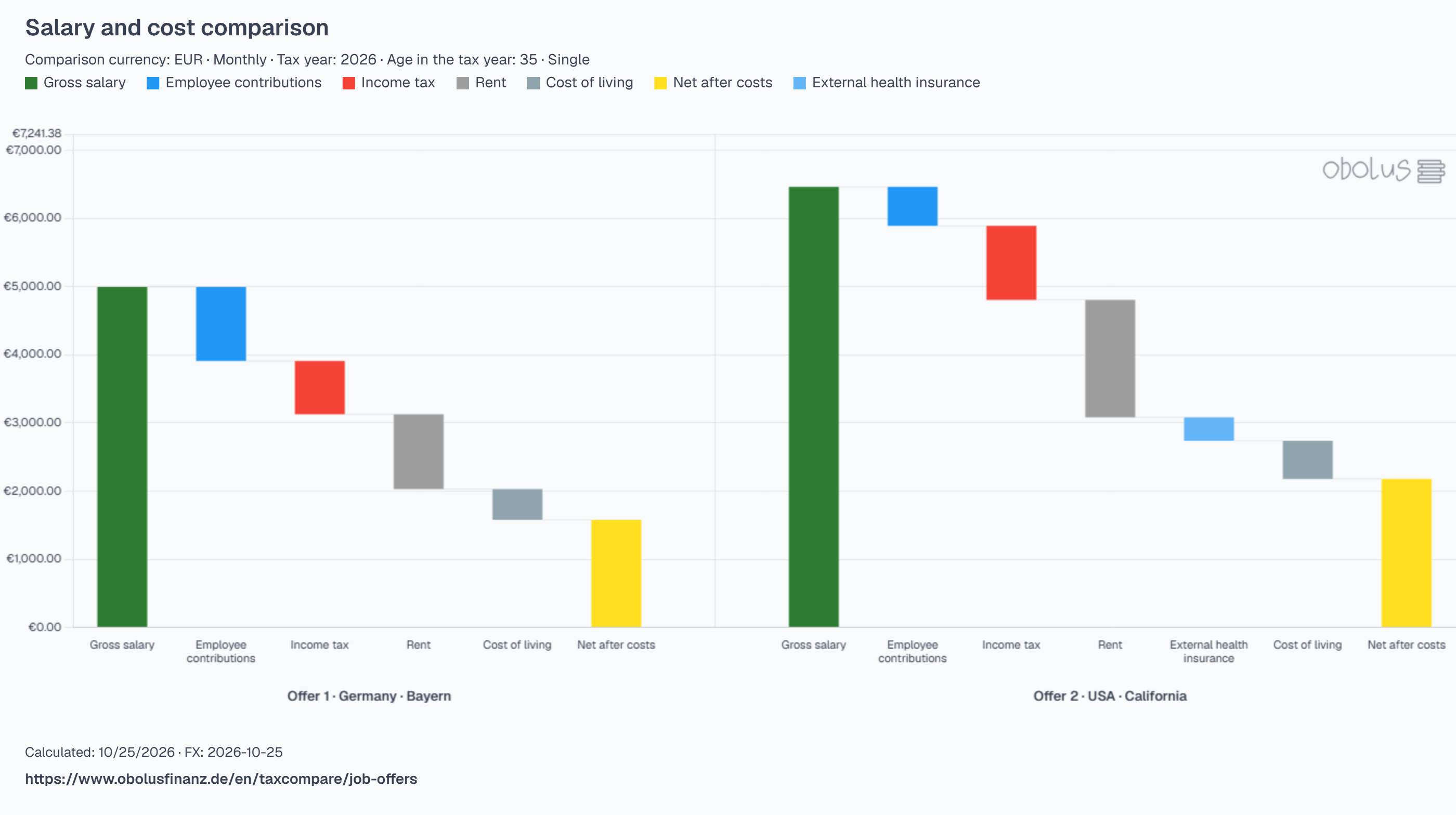
| Amount | Germany · Bavaria | USA · California |
|---|---|---|
| Gross pay | €5,000.00 | €6,465.52 |
| Employee contributions | €1,087.50 | €572.20 |
| Tax | €782.42 | €1,084.01 |
| Payroll net | €3,130.08 | €4,809.31 |
| Rent | €1,100.00 | €1,724.14 |
| External health insurance | €0.00 | €344.83 |
| Groceries | €300.00 | €387.93 |
| Utilities | €150.00 | €172.41 |
| Remainder after entered costs | €1,580.08 | €2,180.00 |
Transport and Other are explicitly zero for this limited example. The remainder therefore does not include other transport, leisure or savings expenses. The USD 400 external-health amount is an invented additional-cost assumption, not an insurance-premium recommendation. Monthly values are annual averages, not promised monthly payslips. This illustrates the calculation, not a recommendation to choose an offer.
Add your rent and living costs
Rent, external health insurance and cost of living have independent on/off buttons. Living costs have just four inputs: groceries, utilities, transport and other costs. Use Budget defaults loads editable one-adult model values for the offer's country in its local currency. Utilities include communication; Other groups dining, leisure and any general insurance included in that model. The button replaces those four amounts and leaves rent and external health unchanged. These are starting assumptions, not a complete personal budget.
Enter costs in the country's local currency. Empty means unknown; zero must be entered explicitly. Missing enabled costs keep the remaining-income result incomplete. Include utilities only when they are not already in rent, and do not enter rent or external health premiums again under other living costs. Contributions already deducted from payroll net are not deducted twice. Where you have separate health premiums, enter them yourself; the tool does not assume an amount for you.
Compare, then continue with one offer
The available countries are Germany, Austria, Switzerland, the USA, the UK, Ireland, Canada and Australia, using the regions offered in the form. The current release covers standard single employees without children for 2025 or 2026. Other family profiles are marked unsupported rather than silently replaced.
Select a reference offer to see differences, or continue with one offer in the salary calculator, Budget or Cockpit. Budget receives the selected offer's income and the cost categories you entered. Country and currency conversion alone do not make housing, benefits or living standards equivalent.
Export the graph or share the inputs
Download the complete waterfall as a branded PNG, including offers outside the visible scroll area and the page URL below the graph. The accessible chart-data table remains available alongside it.
The Share comparison button creates a link containing your entered salaries, profile details and costs. The link is not encrypted: anyone with it can load those inputs. Loading requires an explicit action, and selecting Compare offers calculates fresh results. Saving a draft on your device is a separate action.
Open the job-offer comparison and replace the example amounts with the salary and costs relevant to each offer.